
7 Reasons Top Engineering Teams Are Ditching MCP (Backed by the MCPGAUGE Study)
In this article
- The Universal AI Adapter That Is Quietly Breaking Production
- Why Top Engineering Teams Are Abandoning the Model Context Protocol
- Deconstructing the MCP Token Bloat Architecture
- How Heavy Abstraction Layers Degrade Deterministic Execution
- Building Composable Bash Scripts for Agent Workflows
- The Verdict: Raw MCP vs CLI vs Code Mode
Why are top engineering teams quietly ripping MCP out of their production stacks?
We all loved the idea of a universal AI adapter when it launched. But the operational reality is proving to be a massive, expensive headache. And it's costing you more than just money.
⚡ TL;DR: The 3 Agent Architectures Defined
- Raw MCP: The agent dynamically discovers tools at runtime by reading massive JSON schemas. High flexibility, but catastrophic token overhead.
- CLI / Skills: The agent executes targeted bash scripts or opinionated Markdown commands. Zero schema overhead, highly deterministic, but requires manual tool wiring.
- Code Mode MCP: The agent writes a one-off orchestration script that executes in a secure sandbox. Combines MCP's standardisation with the token efficiency of CLI — but requires dedicated infrastructure to run and audit.
The Universal AI Adapter That Is Quietly Breaking Production
The Model Context Protocol arrived with enormous promise. Anthropic positioned it as the "USB-C for AI" — a single, standardised layer letting any LLM plug into any tool, database, or enterprise system without bespoke integration code.
The ecosystem responded fast. MCP became a Linux Foundation project backed by major cloud providers. Thousands of community-driven servers appeared on directories like MCP.so almost overnight.
But production is where illusions get stress-tested.
The Illusion of the "USB-C for AI" Standard
Picture a senior engineer deploying an AI coding agent to automate pull request reviews. They initialise an MCP server connecting GitHub, Jira, and Slack. In development, it works beautifully.
In production, the agent starts failing silently. It returns contradictory analysis and misses obvious context.
The culprit isn't the model. It's the context window.
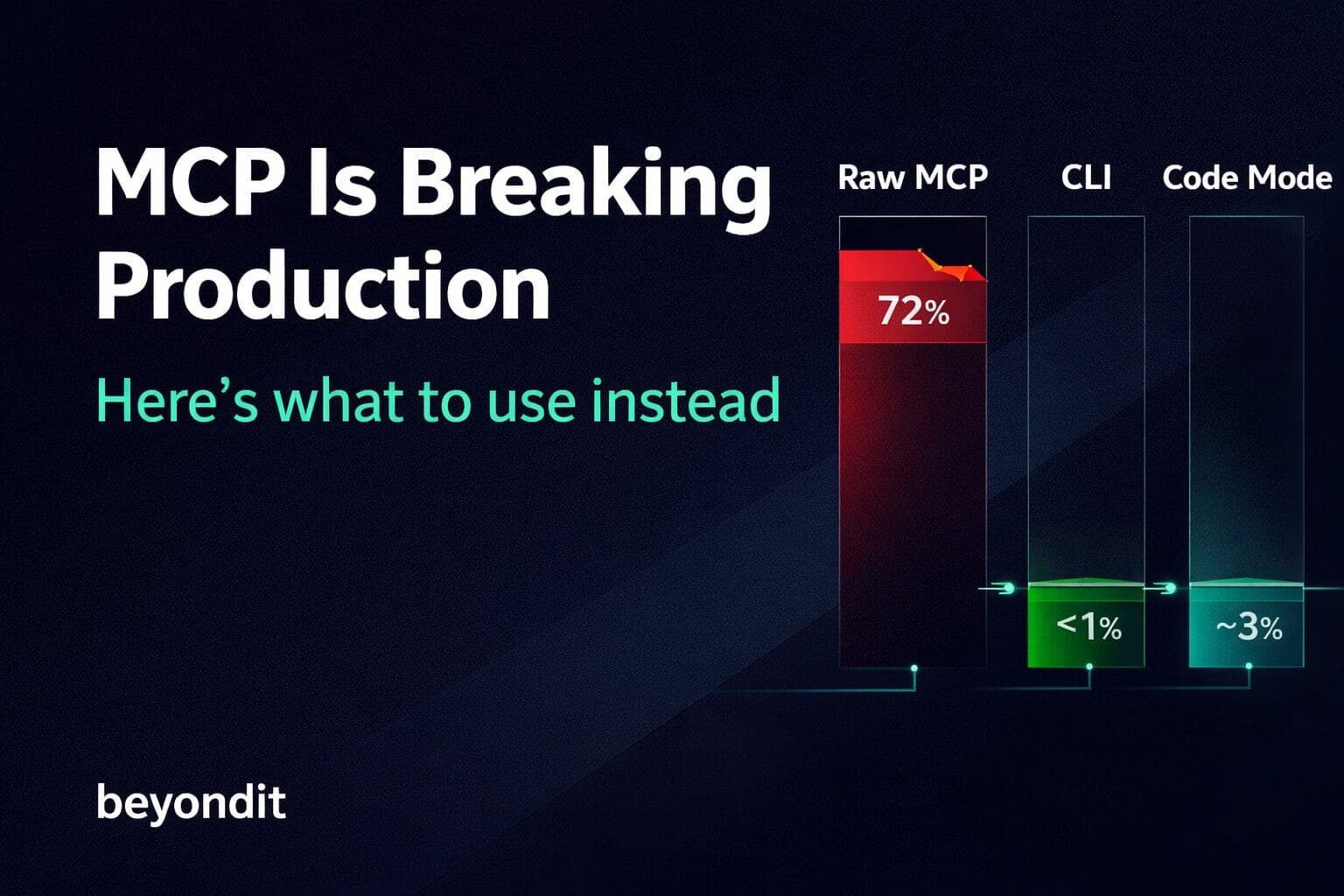
MCP's tool schema overhead had already consumed 72–74% of the available 200,000-token window before the agent processed its first real prompt. The "USB-C" metaphor is seductive but misleading — USB-C transfers data at near-zero overhead. MCP transfers metadata describing tools at a catastrophic cost.
[!WARNING] The headline numbers are damning enough: MCP integrations inflate input token volume by 3.25x to 236.5x depending on schema complexity according to the MCPGAUGE benchmark paper (arXiv, August 2025).
To make that concrete: a single GitHub MCP tool — assign_copilot_to_issue — consumes 810 tokens on its own. Expose 2,500 endpoints and you're looking at upwards of 244,000 tokens of pure overhead before a single user task begins.
That's not a schema tax. That is the context window itself.
The schema overhead alone — before the agent processes its first useful token — costs approximately $1,600/day at scale: 44,026 tokens × Claude 3.5 Sonnet's $3.75/million input pricing × 10,000 sessions. Pure waste, before a single line of useful work.
When token bloat hits $1,600 a day for a single workflow, it's no longer an infrastructure quirk — it's a board-level cost problem. And that is exactly why the smartest teams are jumping ship from their default configurations.
Why Top Engineering Teams Are Abandoning the Model Context Protocol
The breakaway from MCP isn't happening in blog posts. It's happening quietly — in production architecture reviews — where senior engineers, already wary of the AI career trap, stop asking "how do we use MCP?" and start asking "how fast can we replace it?"
Two signals in 2026 made this mainstream.
Garry Tan's Critique and the Shift to Opinionated Tools
Y Combinator's CEO Garry Tan didn't write a nuanced hot-take. He switched. His team built gstack — a set of opinionated workflow skills implemented as pure Markdown slash commands that embed senior engineering judgement directly into Claude Code workflows.
That's the key architectural distinction. Instead of letting an LLM discover tools at runtime through MCP schema negotiation, gstack encodes exactly what to do, in what order, with what constraints — as version-controlled, reviewable text files. Skills as code.
Perplexity made the same MCP-replacement call. CTO Denis Yarats publicly noted that authentication friction across multiple MCP servers was degrading production reliability. Perplexity pulled major workflows off MCP entirely and routed them through conventional APIs using standard bearer tokens.
The 1,000+ Unauthenticated Servers Security Crisis
This is the one that should worry your CTO more than any benchmark.
Security scans throughout 2025 found a rapidly escalating exposure problem. Trend Micro identified 492 servers with zero authentication in mid-2025, exposing 1,402 internal tools to anonymous external access. Bitsight's independent analysis found approximately 1,000 exposed servers by December 2025.
Unlike a traditional API that returns data, an MCP server acts. It writes files. It triggers deployments. An unauthenticated MCP server isn't a data leak — it's an open control surface.
[!CAUTION] Now here's the argument MCP defenders reach for: "But OAuth 2.1 is already in the spec." They're right. But spec and production are different things. A March 2026 analysis of over 5,200 MCP deployments found that only 8.5% utilise OAuth — with 53% still depending on static API keys or personal access tokens.
Deconstructing the MCP Token Bloat Architecture
The numbers tell you what's broken. The architecture tells you why it stays broken. These aren't configuration mistakes you can tune away. They're structural.
How Token Bloat Makes Your Agent Dumber
Token overhead doesn't just cost money. It actively makes your agent dumber. The MCPGAUGE study found MCP's context window tax degrades agent reasoning accuracy by an average of 9.5%. High token counts act as noise. The signal your agent needs gets drowned out by thousands of tokens describing tool schemas it will never use.
The Stateful Session Bottleneck Limiting Scalability
MCP's architecture relies on long-lived, stateful connections between the LLM and the tool server. Fine for a single developer on a local machine. A scalability nightmare for enterprise deployments. Early 2026 roadmap fixes for this (horizontal scaling) are still heavily under-developed.
How Heavy Abstraction Layers Degrade Deterministic Execution
As Patrick Kelly put it in his March 2026 MCP vs CLI benchmark: "MCP is a primitive, not a strategy. MCP is infrastructure, like HTTP. HTTP doesn't make web apps fast. Architecture does."
MCP's dynamic tool discovery lets an LLM auto-select tools at runtime. But that lookup is inherently non-deterministic. And this is precisely where Code Mode MCP changes the calculus entirely.
Code Mode generates a typed programmatic interface from the MCP server's schema — then gives the agent a sandboxed execution environment. Tool invocations are batched inside a script; the LLM context receives only the final result.
Before you commit to Code Mode, here are the five things it won't fix for you:
- Infrastructure cost: every sandboxed execution spins up an isolated runtime.
- Sandbox complexity: you're now operating a secure runtime with managed bindings.
- Debugging overhead: LLM-generated orchestration code can be buggy; reproducing a failure is hard.
- Compliance risk: high-risk EU system provisions take full effect in August 2026.
- Human-in-the-loop gaps: any network request from the sandbox must route through a checkpoint.
// Code Mode MCP - conceptual orchestration pattern
// PSEUDOCODE: illustrative pattern only - not a drop-in module.

async function runOrchestration(env) {
  // Step 1: Discover tools once - not on every call
  const tools = await env.GITHUB_MCP.listTools();
  const prTool = tools.find(t => t.name === "get_pull_request");

  // Step 2: Execute full workflow in a single sandboxed script
  const pr = await env.GITHUB_MCP.callTool(prTool.name, {
    repo: env.GITHUB_REPO,
    pr_number: env.PR_NUMBER
  });

  // Step 3: Return only the structured result - LLM context receives this only
  return JSON.stringify({
    title: pr.title,
    changed_files: pr.changed_files,
    additions: pr.additions,
    deletions: pr.deletions
  });
}
Building Composable Bash Scripts for Agent Workflows
The core principle is explicit control over the context string. A bash script returns precisely what the agent needs to know.
#!/bin/bash
# agent-pr-summary.sh - token-efficient PR summary for LLM consumption
# Usage: ./agent-pr-summary.sh <PR_NUMBER>
set -euo pipefail

PR_NUMBER="${1:?Error: PR number required}"
REPO="${GITHUB_REPO:?Error: GITHUB_REPO env var not set}"
TOKEN="${GITHUB_TOKEN:?Error: GITHUB_TOKEN env var not set}"

MAX_RETRIES=3
RETRY_DELAY=2

for ((i=0; i<=MAX_RETRIES; i++)); do
  response=$(curl --fail-with-body --silent --show-error \
    -H "Authorization: Bearer ${TOKEN}" \
    -H "Accept: application/vnd.github.v3+json" \
    "https://api.github.com/repos/${REPO}/pulls/${PR_NUMBER}" 2>&1)

  exit_code=$?
  if [ $exit_code -eq 0 ]; then
    echo "$response" | jq '{
      title: .title,
      state: .state,
      body: .body,
      changed_files: .changed_files,
      additions: .additions,
      deletions: .deletions
    }'
    exit 0
  fi

  if [ $i -eq $MAX_RETRIES ]; then
    echo '{"status":"error","message":"API rate limit failed."}'
    exit 1
  fi
  sleep $RETRY_DELAY
  RETRY_DELAY=$((RETRY_DELAY * 2))
done[!NOTE] This returns six targeted fields instead of the 200+ field JSON blob the GitHub API natively produces. Your agent consumes roughly ~120 tokens for the response rather than several thousand. That difference compounds across hundreds of tool calls per session.
And you can easily wrap any arbitrary REST API execution safely into an ephemeral environment:
#!/bin/bash
# Defensive CLI wrapper - prevents agent hallucination on hung or failed calls
set -euo pipefail

ENDPOINT="${1:?Error: endpoint required}"

response=$(curl --fail-with-body --silent --show-error \
  --max-time 30 \
  -H "Authorization: Bearer ${AGENT_API_TOKEN}" \
  "${ENDPOINT}" 2>&1)

exit_code=$?

if [ $exit_code -ne 0 ]; then
  echo '{"status":"error","code":"'"${exit_code}"'","message":"External call failed. Do not proceed."}'
  exit 1
fi
echo "${response}"
The Verdict: Raw MCP vs CLI vs Code Mode
The deeper lesson from 2026's "Great Decoupling" isn't that MCP is bad. It's that opaque ecosystems are dangerous at scale. The CLI-first, bearer-token-auth approach gives you a fully auditable, deterministic execution path. In production engineering, explainable beats clever — always.
Use CLI when:
- You have >10 discrete, high-frequency tool calls per session
- Auth must be strict with full audit trails
- Execution must be deterministic and reproducible in CI/CD
Use Code Mode MCP when:
- The agent orchestrates complex, multi-step or looped workflows
- Token budget is critical and raw MCP schema cost is unacceptable
- You've addressed sandbox complexity, compliance, and infrastructure costs
Avoid Raw MCP when:
- Calls are frequent and schema re-sends compound
- You need horizontal scaling today (stateful sessions block it)
- Execution must be deterministic (dynamic schema lookup is not)
So — are you on raw MCP, CLI, or Code Mode in production right now? I want to hear which trade-off you landed on and why.